![401GO-Logo-LG.png]](https://help.401go.com/hs-fs/hubfs/401GO-Logo-LG.png?height=50&name=401GO-Logo-LG.png)
Before submitting payroll, we recommend you review the Menu > Withholding Amounts section in 401GO. This will ensure you have the most up-to-date information for your employee’s deferrals.
Each time your employees log in to their 401GO account and update their contributions, this report is updated. 401GO company admin users will also receive a report each pay period detailing any changes made since the last time you submitted payroll.
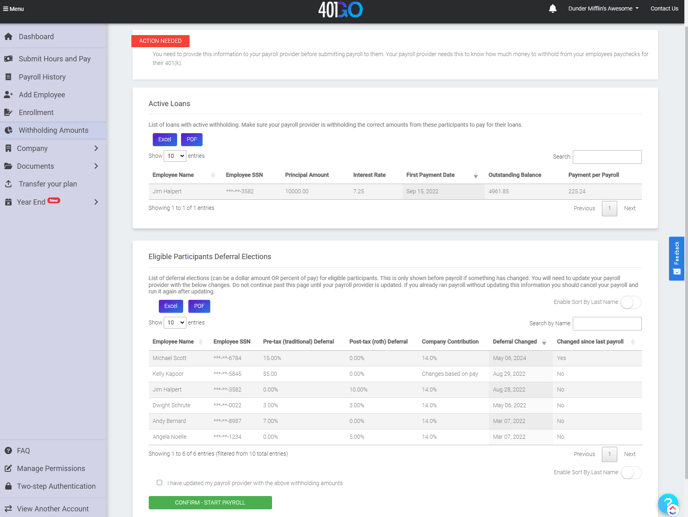
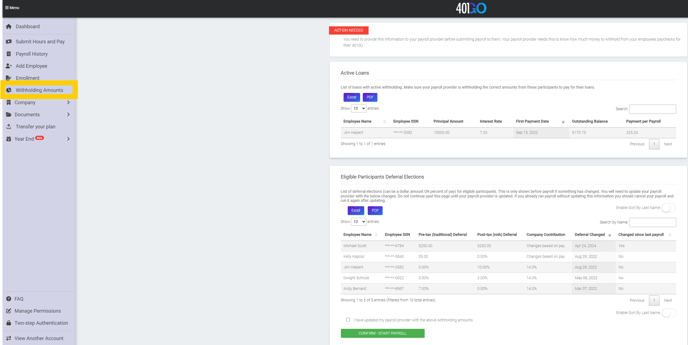
Please review the list and ensure changes are up to date before submitting payroll. Then check the box, “I have updated my payroll provider with the above withholding amounts,” and click Confirm - Start Payroll.
You can also see information here about employees’ 401(k) loans. Remember to withhold loan payments from the employees’ checks according to their payment schedule.