![401GO-Logo-LG.png]](https://help.401go.com/hs-fs/hubfs/401GO-Logo-LG.png?height=50&name=401GO-Logo-LG.png)
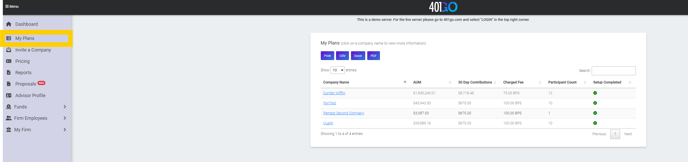
"My Plans" summaries all your plans that you are advisor of record on. You can see at a glance plan information such as:
- AUM
- 30 Day Contributions for the plan
- Charged Fee to the plan
- Participant Count for the plan
- If the setup is completed for the plan
By clicking on the name of the company name, it will open a new screen with additional details for that company. This new screen give access to the following tabs and information:
- General Information: AUM, Address, Contact Person: Email, 30 day Contribution, Setup Status, Phone Number, Referred By.
- Participants: Account Number, Employee Name, Email, Date of Hire, Date of Eligibility
- Clicking on a participant name inside this screen will all you to view participant level information such as : AUM, Setup Status, Email, 30 Day Contribution, Phone Number.
- Allows you a link to "Request Full Access Permission" If selected, an email will go out to the participants email address on file stating that you are requesting full access to their participant account.
- Billing Information: View fees on the plan. It also allows you to "Change Pricing Tier." If you choose to change the Pricing Tiering, make sure to download the updated fee discloser from that screen by click on "Download Fee Disclosure." If you don't see you a pricing tier you need, return to the "Pricing" tab and click on "Create A Tier." Once you are finished creating the new pricing tier, return to "My Plans" Tab and click on company name and select "Billing Information". Once there, select from the drop down the newly created pricing tier. Make sure to "Download Fee Disclosure" once you have updated the new fee.
- View as "Company Name" Company: Allows you a link to "Request Full Access Permission" If selected, an email will go out to the company's email address on file stating that you are requesting full access to their Plan level account.