![401GO-Logo-LG.png]](https://help.401go.com/hs-fs/hubfs/401GO-Logo-LG.png?height=50&name=401GO-Logo-LG.png)
The Advisor Profile allows you to to control the contact information available to your clients 401GO website.
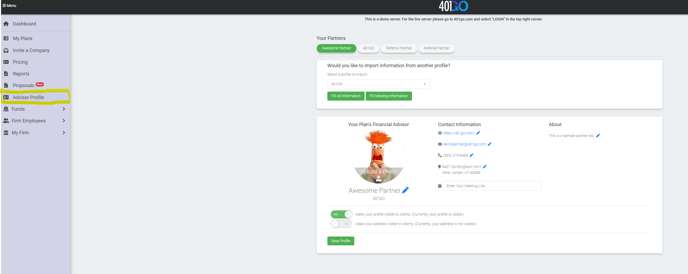 "Your Partners" section allows you to import your advisor partners profiles under the firm level. You can even fill in or update advisor information from this screen as well by following the below steps:
- Select from the drop down the advisor partner profile you would like to view.
- Choose from "Fill All Information" or Fill Missing Information" and the advisor partner profile will appear in the section below.
- Once all information has been captured or changed, select "Save Profile."
You have options to make your profile information visible to your client, display or hide your address to your clients, or have a display default option on the firm level that gives contact information to all firm clients.